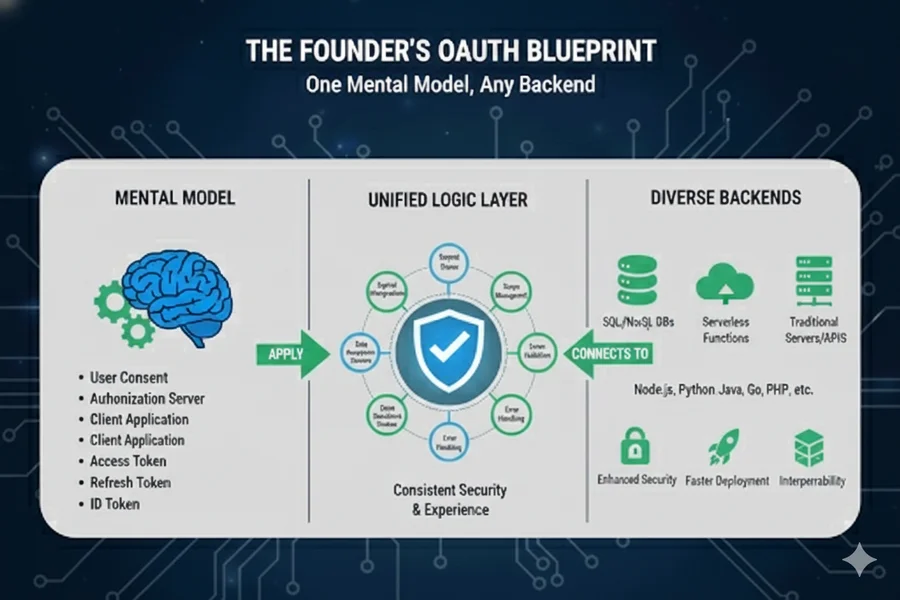
Building a lean startup, and especially ais an exercise in ruthless prioritization. As a founder, your most precious resource isn't capital; it’s the velocity of your feedback loops. Every hour spent wrestling with OAuth redirect loops or debugging session persistence is an hour stolen from talking to customers or refining your value proposition.
Yet, authentication is the "front door" of your product. If it’s clunky, users bounce. If it’s insecure, your reputation is dead on arrival. This blueprint provides a universal mental model for OAuth that cuts through the noise of framework-specific documentation, allowing you to implement secure, scalable auth in any stack—Django, FastAPI, Express, or Flask—without losing your mind.
The Universal Truth: It’s Always the Same Flow
Regardless of the library syntax, the sequence remains:
Step 1: Choose Your Identity Strategy (The Lean Decision)
In the Lean Startup methodology, you must decide between Speed to Market and Long-term Control.
The Identity Strategy Matrix
Layer Options | Founder's Decision Logic |
|---|---|
OAuth Providers | Start with Google (B2C/SaaS). Add GitHub for devs or LinkedIn for B2B. |
Backend Framework | Use what you are "fluent" in. Don't learn a new language for auth. |
Data Layer | Supabase Auth for speed; Self-managed Postgres for maximum control. |
The Critical Fork: Managed vs. Custom
🚀 Option A: Managed Auth (e.g., Supabase, Clerk, Auth0)
This is the MVP choice. You offload the security burden to a third party.
- The Flow: Your Frontend → Managed Provider → IdP → Managed Provider → Your App.
- Pros: Handles edge cases like MFA, password resets, and brute-force protection out of the box.
- Cons: Monthly active user (MAU) costs can scale quickly; minor vendor lock-in.
🔧 Option B: Backend-Managed (Self-Hosted)
This is the Scale/Compliance choice. You own the entire data row.
- The Flow: Your Frontend → Your Backend → IdP → Your Backend → Your Database.
- Pros: Zero per-user cost; complete control over user data schema; no "middleman" latency.
- Cons: You are responsible for security patches and session management.
Decision Rule: If you haven't found Product-Market Fit (PMF), use Supabase. If you have specific regulatory requirements (HIPAA) or a massive existing user base, go Self-managed.
Step 2: Configure & Implement
2.1 Register Your OAuth Apps
You cannot skip this. You must register your "Client" with Google or GitHub to receive your client_id and client_secret.
Framework | Common Callback Pattern |
|---|---|
Django (Allauth) | /accounts/google/login/callback/ |
FastAPI / Express | /auth/google/callback |
Flask (Dance) | /login/google/authorized |
2.2 Framework-Specific Implementation
Django: The "Batteries Included" Approach
Django is the king of rapid prototyping for founders. Using django-allauth turns OAuth into a configuration task rather than a coding task.
# settings.py - The Lean Setup
INSTALLED_APPS = [
    'allauth',
    'allauth.account',
    'allauth.socialaccount',
    'allauth.socialaccount.providers.google',
]

SOCIALACCOUNT_PROVIDERS = {
    'google': {
        'APP': {
            'client_id': env('GOOGLE_CLIENT_ID'),
            'secret': env('GOOGLE_CLIENT_SECRET'),
        },
        'SCOPE': ['profile', 'email'],
        'AUTH_PARAMS': {'access_type': 'online'},
    }
}
FastAPI: The Modern, High-Performance Choice
FastAPI is excellent if you need to build a high-concurrency API. It’s "lightweight," meaning you have to be more explicit about your logic.
from fastapi_sso import GoogleSSO

google_sso = GoogleSSO(
    client_id=os.getenv("GOOGLE_CLIENT_ID"),
    client_secret=os.getenv("GOOGLE_CLIENT_SECRET"),
    redirect_uri="https://api.yourdomain.com/auth/google/callback"
)

@app.get("/auth/google/callback")
async def google_callback(request: Request):
    # This helper handles the code exchange and profile fetching
    user = await google_sso.verify_and_process(request)

    # Logic: Find or Create User in Postgres
    db_user = await get_or_create_user(email=user.email, name=user.display_name)

    # Issue your own JWT for the session
    token = create_access_token(data={"sub": db_user.email})
    return {"access_token": token, "token_type": "bearer"}
2.3 Connect to Your Database: The "Upsert" Pattern
When the OAuth provider sends back the user data, you shouldn't just "Insert." You should Upsert (Update or Insert). This ensures that if a user changes their Google profile picture, your app reflects it on their next login.
The Ideal SQL Schema for OAuth:
-- The 'users' table holds the core identity
CREATE TABLE users (
    id UUID PRIMARY KEY DEFAULT gen_random_uuid(),
    email VARCHAR(255) UNIQUE NOT NULL,
    full_name VARCHAR(255),
    last_login TIMESTAMPTZ
);

-- The 'social_accounts' table allows one user to link Google AND GitHub
CREATE TABLE social_accounts (
    id UUID PRIMARY KEY DEFAULT gen_random_uuid(),
    user_id UUID REFERENCES users(id),
    provider VARCHAR(50), -- 'google'
    provider_user_id VARCHAR(255), -- The 'sub' or 'id' from the provider
    UNIQUE(provider, provider_user_id)
);
Step 3: Test & Validate (The Universal Checklist)
A lean founder doesn't just "hope" it works; they validate. Use this checklist before you push to production:
Common Production Pitfalls
1. The "Trailing Slash" Nightmare
Google sees https://app.com/callback and https://app.com/callback/ as two completely different URLs. If your framework adds a trailing slash automatically (like Django), ensure it is present in the Google Cloud Console.
2. The "Hard-Coded Secret" Trap
Founders in a rush often paste secrets into settings.py. Don't. One accidental git push to a public repo, and your app is compromised. Use .env files from day one.
3. HTTPS in Local Dev
Many OAuth providers (like Spotify or certain LinkedIn features) require HTTPS even for callbacks. Use a tool like ngrok or mkcert to provide a local HTTPS environment.
AI-Powered Boilerplate Generation
To move even faster, use this prompt with an LLM to generate the "glue" code for your specific stack:
"I am a founder building a lean MVP using [Stack: e.g., FastAPI + SQLAlchemy]. I need a robust OAuth implementation for [Provider: e.g., Google]. Please provide: 1. A Pydantic/SQLAlchemy model for a User that supports 'Upsert' logic. 2. An async callback function that exchanges the code for a token and maps the profile to my database. 3. Middleware to protect a /dashboard route by verifying a secure HTTP-only cookie. 4. A list of necessary environment variables."
Summary: The Lean Founder’s Choice
If you value... | Choose this path... |
|---|---|
Speed to Market | Supabase Auth + Next.js/FastAPI |
Data Sovereignty | Django + Allauth + Postgres |
Developer Experience | Express + Passport.js |
Minimalist API | FastAPI + fastapi-sso |
Using the "Founder’s OAuth Blueprint" as a vibe coder using AI to do the heavy lifting isn't about the code—it's about the strategy. By understanding that the flow is universal, you stop fearing the "Auth Monster" and start building features that your customers actually pay for.
Implement the handshake, automate the upsert, secure the session, and get back to building, measuring and learning!


No comments yet
Be the first to share your thoughts on this article!